Updated for 2025 | By devMontaj
👋 Introduction
In today’s digital age, it’s essential to know how to check if WordPress website — especially if you’re a developer, marketer, or business owner.
Understanding which platform a site uses helps you analyze its SEO strength, flexibility, and structure.
Even in 2025, WordPress powers more than 40% of all websites worldwide. It remains the leading content management system (CMS) because of its simplicity, scalability, and powerful customization features.
In this guide, you’ll learn multiple methods to quickly identify whether a site is built on WordPress or not.
💡 What Is WordPress and Why It Matters
WordPress is an open-source CMS that allows anyone to build, edit, and manage a website without deep technical knowledge. Its user-friendly dashboard, thousands of themes, and countless plugins make it ideal for both beginners and professionals.
From personal blogs to complex eCommerce stores, WordPress offers flexibility, SEO-readiness, and unmatched community support.
⚙️ Advantages of WordPress Websites
✅ Fully customizable design and layout
✅ SEO-friendly structure with clean code
✅ Fast, mobile-responsive performance
✅ Thousands of free and paid plugins
✅ Constant updates and community support
Because it’s open-source, WordPress evolves continuously — making it secure, modern, and performance-driven in 2025
🚀 Why Businesses Still Choose WordPress in 2025
WordPress remains a favorite platform because it’s affordable, scalable, and easy to use. Startups, agencies, and enterprises rely on it for:
Quick installation and setup
AI-compatible plugins
Regular updates and advanced security
It’s the ultimate solution for anyone creating a professional online presence today.
🔍 How to Check If WordPress Website – Easy Methods
🧩 1. View the Page Source Code
Right-click on the webpage and choose “View Page Source” or press Ctrl + U.
Then, search for keywords like wp-content or wp-includes.
If you find them, it’s a clear sign the website runs on WordPress.
🌐 2. Check Common WordPress URLs
Many WordPress websites include default paths such as:
/wp-admin//wp-login.php/wp-content/themes/
Type these after the main domain. If you get a result, the site likely uses WordPress.
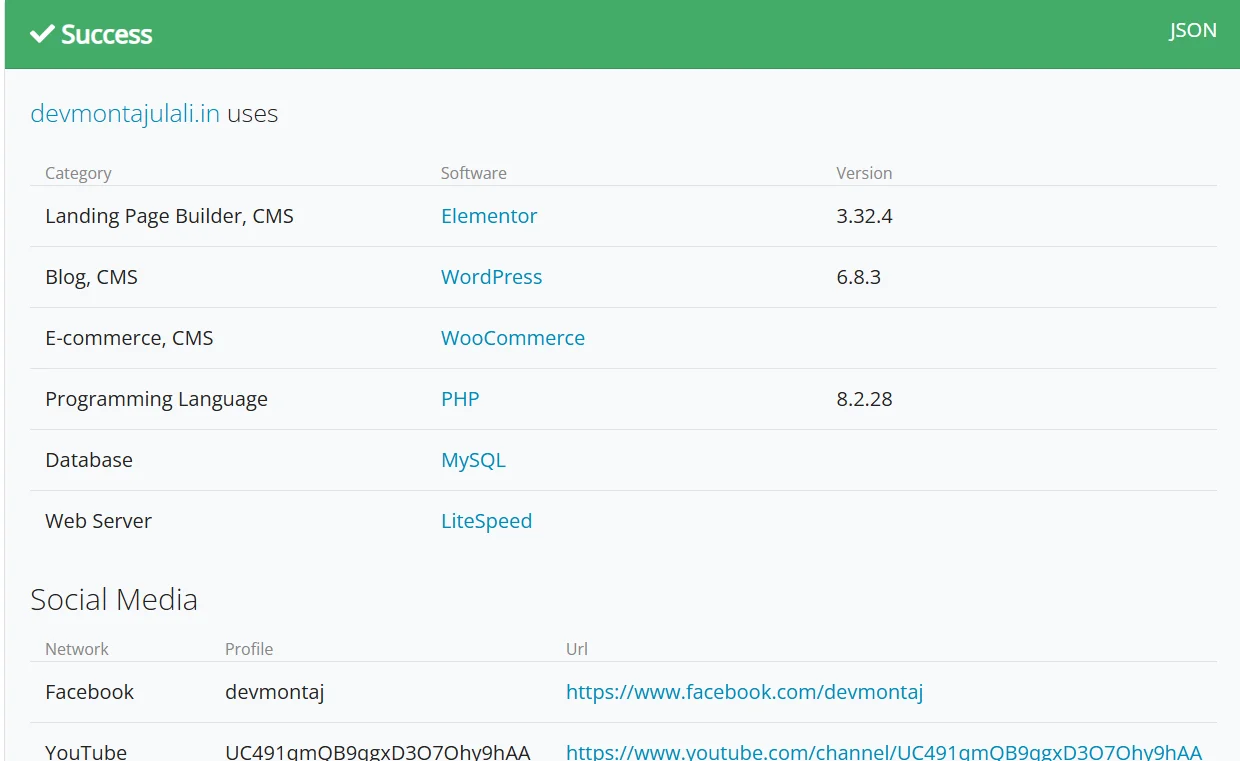
🧠 3. Use Online WordPress Detection Tools
Here are some free tools to check if WordPress website:
Simply paste the URL, and these tools will detect the CMS, themes, and plugins automatically.
Install extensions like Wappalyzer or WhatRuns to identify WordPress sites instantly. These add-ons show you what CMS, hosting, and plugins a site uses — all with one click.
💻 Advanced Tips for Developers
🎨 Identify WordPress Themes and Plugins
Open the site’s source and look for style.css. It often includes the theme’s name and author.
Also, any file path containing /wp-content/plugins/ reveals active plugins.
Tools like WPThemeDetector can show full theme details and plugin lists.
🧾 Check HTTP Headers and Meta Tags
Some websites leave visible WordPress identifiers like:
<meta name="generator" content="WordPress">
or headers such as X-Pingback.
These clues can confirm the site’s CMS, although some owners hide them for security.
🔍 Perform Deep Analysis Using BuiltWith or Wappalyzer
Advanced users can use BuiltWith or Wappalyzer for a complete tech stack report — including hosting, framework, analytics, and plugins. Perfect for competitor research or client audits.
🧱 Common Signs of a WordPress Website
🔑 Login pages like
/wp-login.phpor/wp-admin📝 Footer credits such as “Proudly powered by WordPress”
🧰 Tools like Elementor, Divi, or Yoast SEO (specific to WordPress)
These indicators often confirm a site is using the WordPress platform.
💼 Why It’s Important to Check If WordPress Website
📈 For SEO and Competitor Research
Knowing if a competitor’s site runs on WordPress helps you understand their SEO setup, structure, and plugins. You can compare strategies and even learn from their optimizations.
👉 For professional WordPress help, visit Best Web Developers in Bangalore.
🛡️ For Security and Development
Developers and cybersecurity experts use this knowledge to plan updates, install security patches, and analyze website performance.
🤝 For Freelancers and Client Projects
Freelancers who can instantly identify WordPress sites can offer better redesigns, SEO fixes, and plugin-based improvements for their clients.
❓ FAQs
How can I easily check if a website uses WordPress?
You can view the source code and look for wp-content, or use free tools like IsItWP and WhatCMS.
Are there tools to identify WordPress themes and plugins?
Yes, tools like WPThemeDetector, BuiltWith, and Wappalyzer can detect themes and plugins.
Can website owners hide that their site uses WordPress?
Yes. Advanced users can hide WordPress footprints by removing meta tags, renaming folders, or using plugins like Hide My WP.
🏁 Conclusion
It’s actually quite simple to check if WordPress website — whether by viewing the source code, using browser extensions, or analyzing with online tools.
Knowing this helps developers, marketers, and freelancers make smarter decisions for SEO, design, and technical improvements. As WordPress continues to lead the digital world in 2025, understanding how to recognize it remains a key skill in web development.
Thanks for reading!
Whether you’re just getting started or ready to revamp your site, we’d love to work with you. Get in touch today!